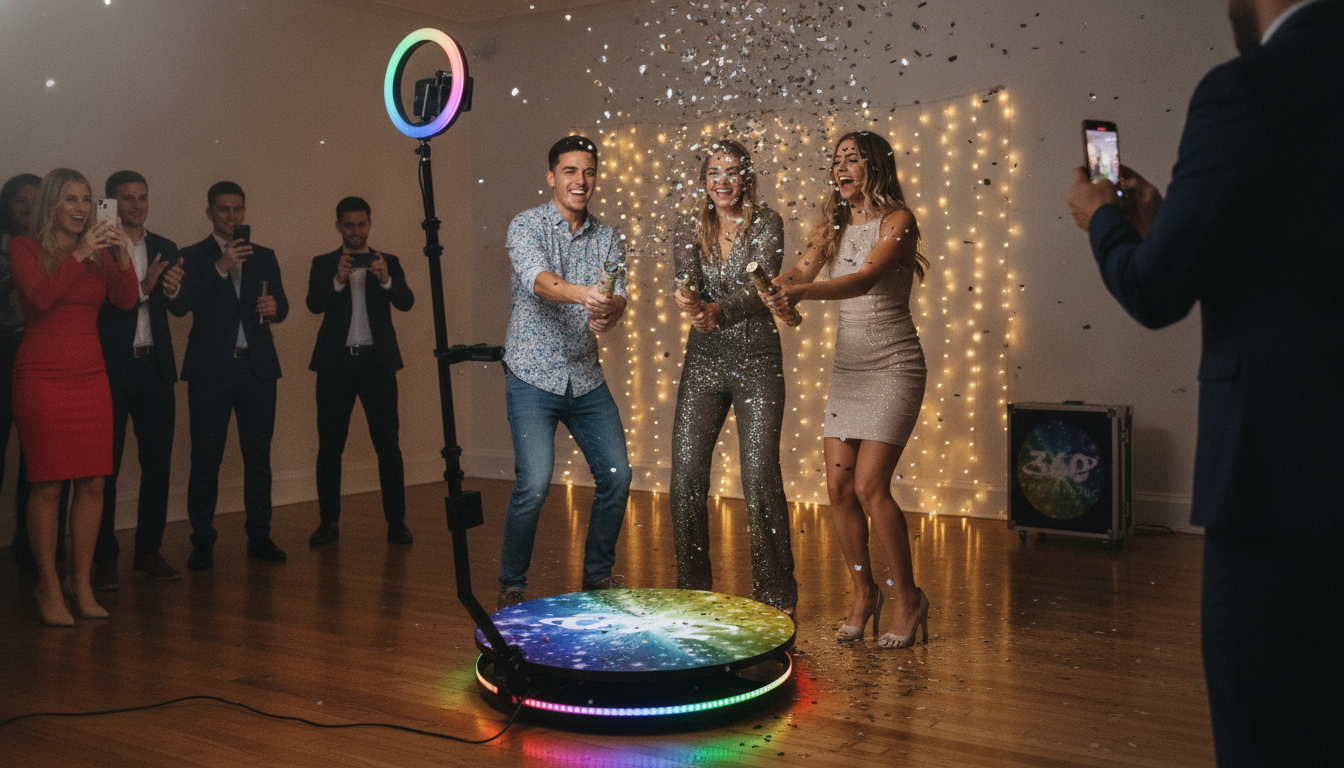
A slow-motion 360 setup turns quick moments—laughs, confetti pops, outfit reveals—into cinematic clips guests actually share. With the right booth, lighting, and a simple flow for guests, you can create polished, social-ready videos at weddings, parties, corporate events, and brand activations without slowing the event down.
What a slow-motion 360 booth does (and why guests love it)
A slow-motion 360 photo booth records a short video while a camera (or phone mount) rotates around a platform, creating the signature “wraparound” look. Because the booth captures movement from all angles, it makes simple actions feel like a mini music video—perfect for social feeds.
- Wraparound perspective: The rotating arm produces a dynamic shot that feels more premium than a standard selfie station.
- Slow motion that flatters motion: Hair flips, jacket turns, dress swishes, champagne sprays, bubbles, and confetti read dramatically (venue rules permitting).
- Vertical-ready exports: With templates and overlays, the final result can be ready to post in the same format guests already use.
- Entertainment + marketing: Branded frames, logos, and event hashtags can be added so every share also promotes the event or sponsor.
Key parts of a reliable setup
Not all 360 booths feel the same in real use. A reliable setup prioritizes smooth rotation, consistent lighting, and safe guest flow—because slow motion makes every wobble, shadow, and shake more obvious.
- Platform size and load rating: Choose based on whether you’ll host 1–2 guests at a time or small groups. A comfortable safety margin reduces wobble and helps guests feel steady.
- Arm stability and smooth rotation: Stable mechanics matter more than flashy features. A smooth, repeatable rotation produces clean slow motion instead of jittery footage.
- Camera/phone compatibility: Confirm the mount type, balancing method, and whether counterweights are included or supported—especially if you switch between devices.
- Lighting that stays consistent: LED lighting keeps faces evenly lit and helps prevent flicker. For dim venues, a ring light or LED panels can make the difference between “okay” and “wow.”
- Control options: Remote start/stop, app control, and motion presets keep lines moving and help every clip match the last.
- Backdrop + floor aesthetics: A clean background and a non-slip surface improve both safety and the final look.
For safety basics—especially at busy events—use common slip and trip prevention practices like clear walkways and stable footing. OSHA provides practical guidance on reducing slip, trip, and fall hazards for public-facing setups: OSHA — Slip, Trip, and Fall Prevention.
Specs that matter before buying or renting
- Frame materials and portability: Sturdy metal construction is a plus, but so is manageable weight. If the booth will travel often, a protective case is worth prioritizing.
- Setup time: Faster assembly reduces staffing pressure and helps you stay on schedule during venue load-in.
- Power needs: Confirm outlet requirements, cable length, and surge protection. Event power can be unpredictable, especially near DJs, uplighting, and catering equipment.
- Software workflow: Know how clips are captured, slowed, edited, watermarked, and delivered—QR, AirDrop, email, or SMS. The best booth in the world feels “slow” if sharing takes too long.
- Privacy and permissions: Plan simple signage and opt-in language if clips will be used for marketing. If testimonials or endorsements are involved, follow the FTC’s guidance: FTC Guides Concerning the Use of Endorsements and Testimonials in Advertising.
- Support and spare parts: Motors, belts, and mounts are wear items. For rentals, easy access to replacements can prevent downtime during peak season.
Quick checklist for comparing slow-motion 360 booths
| What to check |
Why it matters |
What to look for |
| Load rating |
Prevents wobble and improves safety |
Rated comfortably above expected group size |
| Rotation smoothness |
Cleaner slow-motion video |
Stable arm, minimal vibration, consistent speed |
| Lighting plan |
Even skin tones and fewer shadows |
LED panels/ring light; no visible flicker |
| Capture + delivery |
Guest satisfaction and shareability |
Fast exports, QR sharing, branded overlays |
| Portability |
Easier transport and faster setups |
Compact folding design, case, manageable weight |
Event planning: getting the best clips every time
If your workflow includes sharing to iPhones, it helps to know the basics of AirDrop for quick transfers: Apple Support — AirDrop (sharing basics).
Who it’s best for (and when a simpler booth is enough)
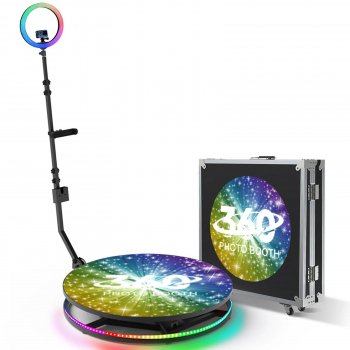
If you’re looking for a centerpiece attraction that produces the signature rotating slow-motion clips guests recognize instantly, the Slow Motion 360 Photo Booth is built for that role. It’s a strong fit for receptions, parties, and corporate events where you want a consistent, repeatable video look guests can share quickly.
Helpful add-ons for styling and operations
At-a-glance details
FAQ
How much space is needed for a slow-motion 360 setup?
Plan for roughly a 10′ x 10′ area as a practical starting point, plus extra clearance for the rotating arm to swing freely. Add room for a small queue and check for overhead obstacles like décor, lighting rigs, or low ceilings.
Can a phone be used instead of a dedicated camera?
Many systems support a phone mount, which can work well if the mount is secure and balanced. Test stabilization, resolution, and storage space ahead of time, and run through the full capture-to-sharing workflow before event day.
How long does it take guests to receive their videos?
Delivery depends on your workflow (templates, on-site editing, and network conditions), but many setups can share within a minute or two. QR-based galleries or instant transfer options can keep the line moving when the booth is busy.
Recommended for you

Leave a comment